
AI for Manufacturing: Start With the Quote, Not the Factory Floor
Most AI for manufacturing advice is about predictive maintenance, vision inspection and digital twins at big-plant scale. For a $2M to $20M manufacturer, the AI that pays back first is usually in the front office: reading RFQs and drawings, drafting quotes and replies, entering orders and finding answers in your own files. Here's how to tell, how to pick your first use case, and what the first 90 days look like.
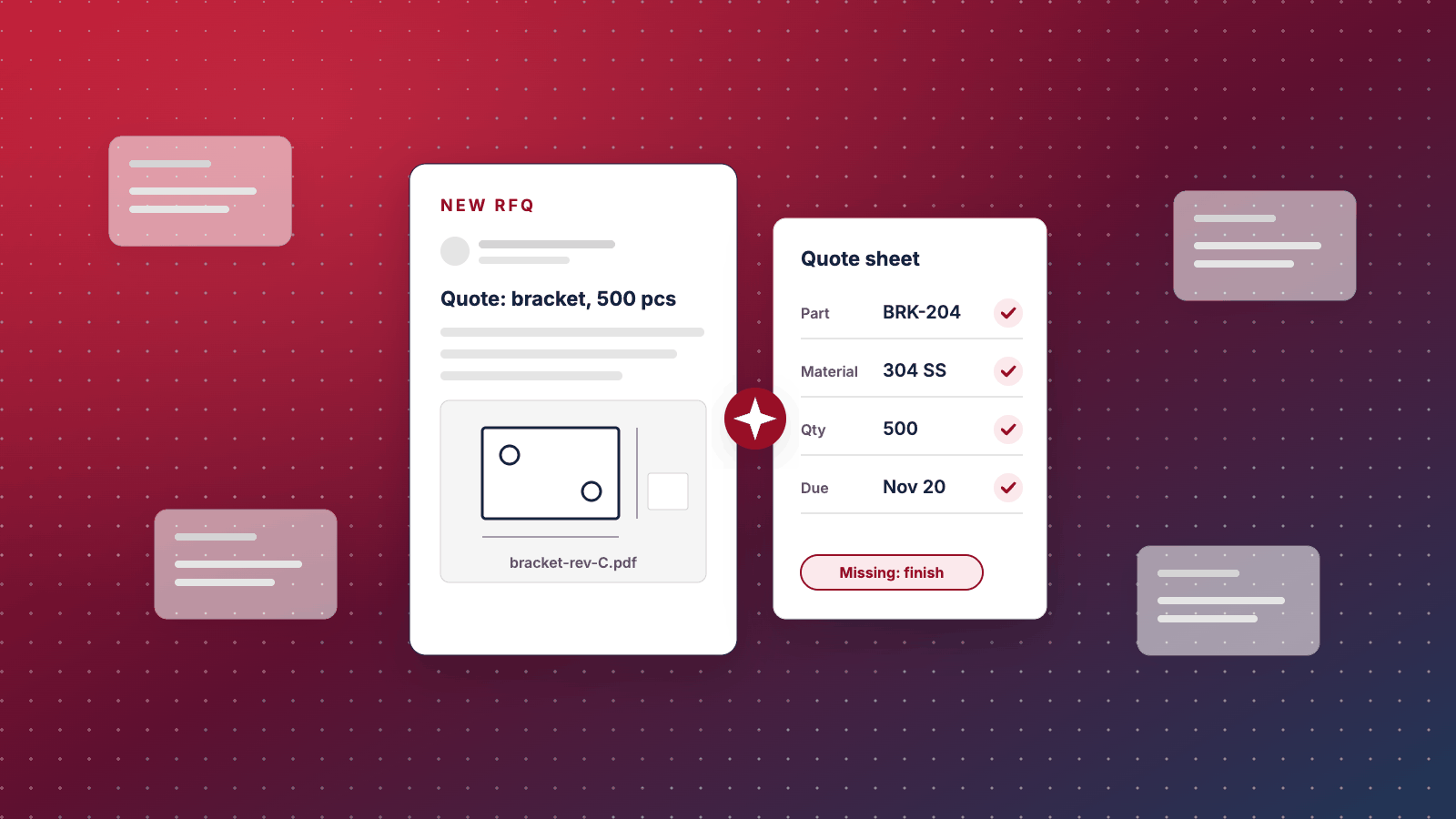
Search for AI for manufacturing and you get the same picture every time: a robot arm, a camera catching defects on a fast line, a dashboard predicting when a spindle will fail, a digital twin of a plant the size of a town. That work is real, and it's mostly written for companies with a data team. If you run a $2M to $20M shop, the AI that pays back first is usually somewhere less photogenic: in the inbox where RFQs land, on the estimator's desk, and in the order entry nobody enjoys.
AI for manufacturing at your size: the short answer
Start where three things are true at once: the work is mostly reading and writing (emails, PDFs, drawings, spec sheets), it happens many times a week, and a person already checks the result before it reaches a customer. In most smaller manufacturers, that's the quote-to-order path: RFQs coming in, specs being pulled out, quotes and replies going back, purchase orders being keyed into the ERP.
Leave floor AI until you have a specific, expensive problem and the data to go with it. And don't start anywhere until you've measured how long the job takes today, because without that number you won't know whether the AI helped.
The rest of this article makes the case, shows where we think it's wrong, and gives you a way to score your own first use case.
Most AI in manufacturing advice is written for a bigger plant
The big surveys show what the industry is focused on. Rockwell Automation's 2025 State of Smart Manufacturing report surveyed more than 1,500 manufacturers in 17 countries: 95% said they have invested in or plan to invest in AI or machine learning over the next five years, and quality control was the top use case for the second year running, with 50% planning to apply AI to product quality in 2025 (Rockwell Automation, via Control Global, 2025). The use cases it tracks are mostly on the floor: inspection, maintenance, the line.
Smaller companies are in a different place. The US Census Bureau asks businesses every two weeks whether they use AI. In data running to May 2026, 19.8% of all US businesses said yes, and use was far higher among larger firms (US Census Bureau, May 2026).
Share of US businesses using AI in any business function
There's a detail in that survey that matters for manufacturers. In November 2025, Census changed the question from AI used "in producing goods or services" to AI used "in any of its business functions." Reported adoption rose in all five industries the Fed looked at, and the biggest relative jump was in manufacturing: 159%, or 7.5 percentage points (Federal Reserve Board, FEDS Notes, April 2026). The Fed doesn't say why. Our reading is that a good share of the AI manufacturers use isn't on the production floor at all. It's in the office, and the old question didn't count it.
Why the quote-to-order path pays back first
Four reasons, and they're all about the shape of the work rather than the cleverness of the technology.
The work is text. An RFQ is an email with attachments. A quote is a document. A purchase order is a PDF. Today's AI models are at their best reading and writing exactly that kind of material. Reading a vibration signal or a camera feed is a different problem, and it usually needs data you don't have yet.
The data already exists. Your inbox holds years of RFQs. Your quoting spreadsheet or ERP holds what you quoted and what you won. Floor AI often starts with installing sensors and then waiting months to collect enough history to learn from.
A person already checks the output. An estimator reviews every quote before it goes out. Customer service reads every reply. That review step is what makes it safe to let AI do a first draft: when it gets something wrong, someone who knows the job catches it. On the floor, a missed defect or a false alarm costs you before anyone looks.
Speed is something buyers notice. In a Paperless Parts survey of more than 400 US manufacturing part buyers and engineers, 67% said they expect a quote in less than 24 hours (Paperless Parts, January 2021). It's vendor research and a few years old, so treat it as directional. But it matches what we found when we checked 150 manufacturer websites ourselves: only 7% said when they'd reply to a quote request (Chykalophia RFQ path study, October 2026). If AI takes the reading and data entry off your estimator's plate, the quote goes out sooner.
The best first AI project is a boring job your team already checks.
Seven front-office jobs worth scoring
These are the candidates we'd look at first in a smaller manufacturer. Not every one will fit your business. The scoring in the next section is how you choose.
| Job | What AI does | What a person still does |
|---|---|---|
| RFQ intake | Reads the email and attachments, fills in an intake sheet (customer, part, material, quantity, due date), flags what's missing | Confirms the fields, decides whether to quote |
| Spec extraction from drawings | Pulls title block data, material and finish callouts, notes and revision from PDF drawings | Checks every value, reads the geometry and tolerances |
| Quote and reply drafts | Drafts the acknowledgement, the clarifying questions and the cover note for the quote | Sets the price and lead time, edits and sends |
| Repeat customer questions | Answers "where's my order," "send the cert," "what's the lead time on X" from your ERP and files | Handles anything unusual or upset |
| Order entry | Reads incoming purchase orders and prepares the order in your ERP, matched against the quote | Approves before it's released |
| Finding answers in your own files | Searches past quotes, specs, procedures and job notes in plain language | Judges whether the old answer still applies |
| Quality and supplier paperwork | Drafts certificates of conformance, nonconformance write-ups and supplier emails from your templates | Reviews and signs |
Notice what's not on the list: pricing. AI can pull together the inputs to a price, such as material, the closest past job and what you quoted then. The number itself depends on your capacity this month, your cost structure and how much you want the work, and it should stay with your estimator.
Where AI on the floor does make sense
We don't think floor AI is hype. We think it's often the second project, not the first, for a company your size. It earns its place sooner when these conditions line up:
- Predictive maintenance, when one machine is your bottleneck, an unplanned stop costs you a lot (missed ship dates, overtime, a customer at risk), and you already have data from it. Many newer machines and controllers record spindle load, temperatures and alarms, and some machine builders sell monitoring. If that data is there, this can be worth a pilot. If it isn't, the first year is mostly collecting it.
- Vision inspection, when you make a high volume of similar parts, the defects are visible, and a miss is expensive (a returned lot, a chargeback, a safety problem). You'll need a few hundred labeled pictures of good and bad parts to start, and someone to keep labeling.
- Scheduling help, when your schedule lives in one person's head and the ERP data is clean enough to plan from. If the ERP routings are out of date, fix those first, because AI will plan from the bad data with confidence.
The common thread is volume, data you already have, and a high cost per mistake. If all three are present, score the floor project alongside the front-office ones. It may win.
Where AI is not worth it yet
Being honest about this is part of the job. These are the cases where we'd tell you to wait:
- The job is rare. If you get four RFQs a month, AI intake saves you very little. Spend the time on getting more of them instead, starting with what buyers check on your website before they send one.
- The knowledge lives in one person's head. AI can only work from what's written down. If your best estimator prices from memory and nothing is recorded, the first project is writing it down, which is worth doing anyway.
- The process changes every week. Automating a process nobody agrees on locks in the confusion. Settle the process, then automate it.
- Nobody would check the output. A chatbot on your website quoting lead times or answering technical questions with no human in the loop is a liability, not a feature.
- The data is controlled. If drawings are ITAR-controlled, carry controlled unclassified information, or sit under a customer NDA that limits where they go, hold off until whoever owns compliance has looked at the tool and its terms.
Pick your first use case in an afternoon
Here's the method we'd use. It takes two people, the owner or a manager plus the person closest to the work, and about three hours.
List the jobs that eat the most time
Ask each person in sales, estimating, customer service and the office: what do you do every day that's mostly reading, retyping or answering the same question? Write down every answer as a job with a verb ("log incoming RFQs," "key POs into the ERP," "look up old quotes"). Aim for eight to twelve.
How to do it
- Pull last week's inbox for the shared quote and orders addresses. Count the emails by type: RFQs, purchase orders, order status questions, cert requests, everything else.
- Ask the estimator and customer service lead to estimate minutes per item for each type. Rough is fine for now.
- Add the jobs people mention that don't show up in email, such as searching for old quotes or building certs.
Steal our AI prompt
I run a manufacturing company with about [number] people. Below is a list of the emails that came into our shared quote and orders inboxes last week, with the subject line and a one-line summary of each. Group them into types of work (for example new RFQs, purchase orders, order status questions, certificate requests). For each type, give the count, what a person has to do to handle one, and whether the work is mostly reading, retyping, looking something up or making a judgment call. Don't recommend any software. List: [paste subject lines and summaries, with customer names removed]
Score each job on five questions
Score each job from 1 to 3 on each question. The highest total is your first candidate. Any job that scores 1 on data is out for now, whatever its total, because there's nothing for the AI to work from.
| Question | 1 | 2 | 3 |
|---|---|---|---|
| Volume: how often does it happen? | A few times a month | A few times a week | Daily or more |
| Time: how long does one take? | Under 5 minutes | 5 to 20 minutes | Over 20 minutes |
| Mistake cost: what happens if the AI gets it wrong and nobody catches it? | A lost customer or a bad part shipped | Some rework or an awkward email | Barely noticed |
| Data: is what it needs already written down? | Mostly in someone's head | Scattered across email and folders | In email, PDFs or the ERP, consistently |
| Checkable: will a person review the output before it matters? | No one would look | Sometimes | Always, as part of the job |
How to do it
See a worked example
This one is made up, but the pattern is typical. A 40-person machine shop scores five candidates:
| Job | Volume | Time | Mistake cost | Data | Checkable | Total |
|---|---|---|---|---|---|---|
| RFQ intake and spec extraction | 3 | 3 | 2 | 3 | 3 | 14 |
| PO entry into the ERP | 2 | 2 | 2 | 3 | 3 | 12 |
| "Where's my order" replies | 3 | 1 | 2 | 2 | 2 | 10 |
| Predictive maintenance on the 5-axis | 1 | 1 | 2 | 1 | 2 | 7 (out: no data) |
| Automatic pricing with no review | 3 | 3 | 1 | 2 | 1 | 10 |
RFQ intake wins. They get around 30 RFQs a week, an estimator spends 20 to 40 minutes on each one just reading and logging before any real estimating starts, the emails and drawings are all in one inbox, and the estimator checks every field anyway. Predictive maintenance is out until they have data from the machine. Automatic pricing scores 10, but a 1 on mistake cost and a 1 on checkable means it shouldn't run unattended at all.
Measure the job before you change it
Before anyone builds anything, time the job for two weeks. If you skip this, you'll end up arguing about whether the AI helped, with no numbers on either side.
For RFQ intake, that means a simple log: when the RFQ arrived, when someone first opened it, how long logging took, how many came in incomplete, and when the acknowledgement went out. If you already keep an RFQ log (we laid out the columns in where quote requests stall), add a column for intake minutes.
Then write down what a good output looks like. For intake, it's a filled-in sheet with every field correct and every missing item flagged. That definition becomes your test.
Keep a person in the loop, and count the corrections
Run the first version so that a person reviews every output before it does anything. Count how many fields they correct. Accuracy you've counted on your own RFQs is the number to trust, not a vendor's demo or a figure from someone else's shop.
Correction counts tell you when it's safe to relax the review. If the estimator is still fixing material callouts on one in five drawings after a month, keep reviewing every one. If corrections have dropped close to zero on a field, you can spot-check that field instead of checking it every time.
Here's the worksheet. Copy it into a spreadsheet and fill it in with your team.
First AI use case: the scoring worksheet
Step 1. List the jobs (eight to twelve, each with a verb)
Job | Who does it | How many per week | Minutes per item
Step 2. Score each job from 1 to 3
- Volume: 1 = a few a month, 2 = a few a week, 3 = daily or more
- Time per item: 1 = under 5 minutes, 2 = 5 to 20 minutes, 3 = over 20 minutes
- Mistake cost if uncaught: 1 = lost customer or bad part, 2 = rework or an awkward email, 3 = barely noticed
- Data available: 1 = in someone's head, 2 = scattered, 3 = consistently in email, PDFs or the ERP
- Checkable: 1 = no one would review it, 2 = sometimes, 3 = always reviewed
Job | Volume | Time | Mistake cost | Data | Checkable | Total
Rules
Step 3. Baseline (two weeks, before any change)
A realistic first 90 days
This is the plan we'd sketch for a narrow front-office job like RFQ intake. A floor project with new sensors runs longer.
Days 1 to 15: pick the job and measure it
Run the scoring above. Start the baseline log. Pull 50 recent RFQs, with their attachments, that cover the variety you actually get: clean PDFs, scanned drawings, a STEP file with no drawing, the customer who writes everything in the email body. These become the test set. Decide who reviews the outputs, and check the terms of any AI tool against your NDAs and any export-control obligations before customer files go near it.
Days 16 to 45: build it narrow and test it on the past
Build the smallest version that does the job: read an RFQ email and its attachments, fill in the intake sheet, list what's missing, and draft the acknowledgement for a person to send. Run it against the 50 past RFQs and compare every field with what your estimator recorded. Fix the prompts and rules where it's wrong. Don't add a second job yet.
How to do it
Steal our AI prompt
You are helping a manufacturing company log incoming requests for quote. From the email and attachments below, fill in these fields: customer company, contact name, contact email, part number, part description, revision, material, finish or coating, quantity or quantities, requested delivery date, attached files and their formats, and any special requirements (certifications, inspection reports, packaging). Write "not stated" for anything you can't find, and never guess. Then list the questions our estimator would need answered before quoting. Finally, draft a three-sentence acknowledgement to the customer confirming the files received and saying our estimator [name] will follow up by [time]. Email and attachments: [paste]
Tools and references
Use a business or API plan from your AI provider, not a free personal account, and read its data terms yourself. NIST's free AI Risk Management Framework is a plain way to think through what could go wrong before you go live. Your state's Manufacturing Extension Partnership center, part of a NIST-backed national network, is a good place to ask about local help and training.
Days 46 to 75: run it live, with a person checking everything
Turn it on for new RFQs. The estimator reviews every intake sheet and every draft before anything goes to a customer, and logs each correction. Keep the old way available. Each week, compare intake minutes, correction counts and time to first reply against your baseline.
Days 76 to 90: decide, and write it down
Put the numbers next to the baseline and make one of three calls: keep it, fix one specific thing and run another month, or stop. Stopping is a fine outcome if the numbers say so; you've learned it for the cost of a narrow pilot instead of a big rollout. Write a one-page note on what it does, who checks it, what it costs to run and what to watch. Then go back to your scoring sheet and look at the second job.
What AI will not fix
A slow or confusing quote process. If quotes sit for a week waiting on one person's approval, faster intake just moves the queue. Map the whole path first.
A website that loses the buyer before the RFQ. AI on the back end does nothing for a request that never gets sent. In our study of 150 manufacturer websites, about half had a dedicated quote request form at all (Chykalophia RFQ path study, October 2026). If yours doesn't, that may be the cheaper fix, and it's work we do on manufacturing websites.
Bad data in the ERP. AI will read wrong routings, wrong part masters and wrong lead times and repeat them back with confidence. Clean data comes first.
The judgment calls. Whether to quote a job, what to charge, and how to handle a customer who's upset stay with your people. The point of the AI is to give them more time for exactly those calls.
AI for manufacturing: questions owners ask
How is AI used in manufacturing?
Two broad ways. On the floor, AI is used for quality inspection with cameras, predicting machine failures from sensor data, and scheduling. In the front office, it reads incoming RFQs, emails and drawings, pulls out the specs, drafts quotes and replies, enters orders, and answers questions from a company's own documents. Big plants get most of the attention for floor AI. For smaller manufacturers, the front-office jobs are usually cheaper to start and quicker to pay back, because the data already exists as email and PDFs and a person already checks the work.
What is the best first AI project for a small manufacturer?
Usually RFQ intake: reading each incoming quote request and its attachments, filling in a structured intake sheet with the customer, part, material, quantity and due date, flagging what's missing, and drafting the acknowledgement. It happens often, takes real time, uses data you already have, and an estimator checks every one anyway. Score your own candidates on volume, time per task, the cost of a mistake, whether the data exists, and whether a person can check the output, and start with the highest score.
Is predictive maintenance worth it for a small manufacturer?
Sometimes. It makes sense when one machine is your bottleneck, an unplanned stop costs you real money, and you already have sensor or controller data from it, or the machine builder offers monitoring. Without that data, the first year goes into collecting it. For most shops in the $2M to $20M range, a good preventive maintenance schedule and an operator who listens to the machine still come first.
Can AI read engineering drawings and RFQs?
It can read a lot of them well enough to save time: the email, the title block, part numbers, material and finish callouts, quantities and dates, especially from clean PDFs. It is less reliable on scanned drawings, dense GD&T and anything it has to infer from the geometry. Treat it as a fast first reader that fills in the intake sheet and flags gaps, with an estimator checking every field before a quote goes out.
Is it safe to put our drawings and customer data into AI tools?
It can be, with the right setup. Use a business or API plan whose terms say your data isn't used to train the provider's models, read those terms yourself, and keep customer drawings out of free consumer accounts. If any of your work is ITAR-controlled or carries controlled unclassified information, talk to whoever owns export compliance before any of it goes into a cloud AI tool. Customer NDAs may also limit where their drawings can go, so check them.
How long does it take to see results from AI in manufacturing?
For a narrow front-office job, you should know within about 90 days whether it works: two weeks to pick the job and measure the baseline, four weeks to build and test it on past examples, four weeks running it live with a person checking every output, and about two weeks to decide whether to keep, fix or stop it. Floor projects that need new sensors or labeled images usually take longer, because collecting the data comes first.
Keep reading
 Automation & Website Support
Website Maintenance: What It Costs and What Goes Wrong
Most website maintenance plans check the software and stop there. For a B2B company, the expensive failures are harder to spot: a quote form that stops reaching sales, a certificate nobody renewed, a backup nobody ever restored. What a plan should cover, what it costs, and a monthly checklist you can copy.
 Branding & Digital Marketing
AI Search Is Changing B2B Discovery: What to Do About It
Your buyers' first reader is now often a machine. It reads your site, decides what you do, and puts you on the shortlist or leaves you off without telling you. The verified data, what it means for manufacturers, and a self-audit to fix it.
 E-Commerce & Conversions
How to Choose an Ecommerce Platform for a B2B or Food and Beverage Brand Going Direct
Shopify, WooCommerce, BigCommerce or Adobe Commerce? For a B2B manufacturer or a food and beverage brand adding direct sales, the right answer comes from how you sell and how much technology you want to own. Here's how to decide.
See exactly where your site is losing conversions
Paste your URL and get an instant conversion score. No form to fill out, no sales call.
Strategies for businesses building what's next.
Occasional notes on turning B2B websites into pipeline. Unsubscribe any time.

